

Getting Started with you internet at CSB
This short guide will help you make the most of your internet connection. If you already know how to set up a local network and understand how routers work, this guide may not be very useful for you, but we recommend that you quickly check it out regardless, to make sure you understand how things work here.
🖥️ Required Equipment
To make the most of your internet connection with Brainmill there are a few things you need to know and have, the first being a router:
Router
We strongly recommend to connect a router to your internet outlet, and connect other devices (computers, smartphones etc) into that router. A router provides you with wifi, 4 additional ethernet ports (in most cases) and it makes sure your devices receive private IP addresses (see more at Public vs. Private IPs). You do not need a modem to connect to the network. You can connect a device directly into your internet outlet but this can pose a security risk and is very restrictive.
Router vs. Access-point
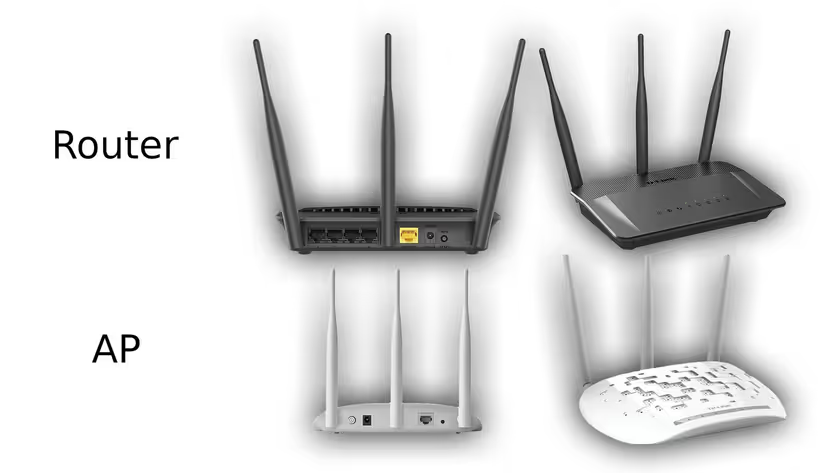
It is suprisingly common to own what looks, swims and quacks like a router, but is actually an access-point (AP), not a router. An AP's function is to provide a wifi network, nothing else. This works fine for some people, as it is quite common nowadays to only own devices that have built-in wifi antennas, and physical ethernet ports are no longer a necessity (as long as you don't mind the speed and reliability penalty that comes with wireless transmission). The problem with APs is the fact that there is no firewall or network address translation (NAT), similar to a switch, meaning that all your devices will get public IPs (again, see more at Public vs. Private IPs). You can tell them apart by looking up the model number, but in general an AP will only have 1 ethernet port instead of 2-5, as seen in the picture below.
Switch (optional)
A switch is the wired counterpart to an AP, giving more devices access to a network. Like an AP, a switch does not do any routing, firewall or NAT, and can lead to problems if used incorrectly. A switch is very useful however if you want more than 1 wired device with a public IP but only have 1 outlet in your apartment, for example if you have a server that you want to be seperate from your home network.
⚙️ Settings
In general the factory settings of routers work fine out of the box. This means that very often a bad configuration can be solved by simply doing a factory reset of your router. In case there are still problems make sure the following settings are correct:
- Connection Type (for the incoming internet): Automatic (DHCP)
- NAT: Enabled
📡 Public vs. Private IPs
When you connect a device directly to your internet outlet (or to an AP/switch which is not behind a router), that device will receive a public IP address from Brainmill's DHCP server. In most cases, only your router needs a public IP address. If you want to expose something to the public, like a web-server or game-server, a portforward in your router is a lot safer than opening the floodgates by not having a router between you and the internet. Only a device behind a router with NAT and DHCP enabled (which they usually are by default) will be able to automatically receive a private IP address, which then comes from said router instead of Brainmill. Private addresses usually look like 192.168.0.XXX, and are provided by your router, while a public IP addresses from Brainmill looks like 95.80.XX.XXX.
In short, you want all your devices to use a private IP address. There are many reasons for this, but most importantly:
- it is more secure, because you otherwise expose your device directly to the internet
- there is virtually no downside to using a private IP address
- it is needed, as CSB only owns a limited amount of public IPv4 addresses to give out.
🔌 Cables
Category
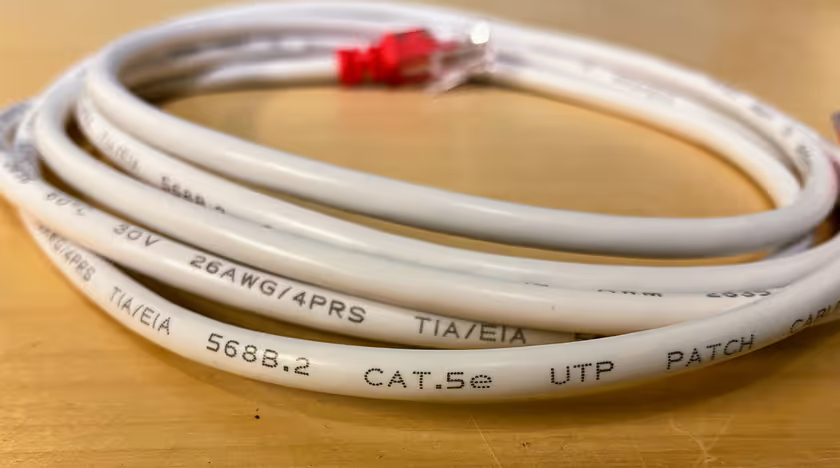
We recommend using at least CAT5e cables for all networking in your apartment, preferably CAT6. Using CAT5 (without the e, the predecessor to CAT5e) often causes problems, as they are not suitable for achieving 1Gbps speeds and break more frequently. The category of the cable is usually printed along the cable as seen on the image below, but if there is no printing on the cable at all it is often of bad quality.
Flat cables
Don't use flat ethernet cables. They are more susceptible to electromagnetic interference due to the fact that the cable pairs are usually not twisted. Flat cables are often CAT5 (which should be avoided as previously mentioned) and therefore unsuitable for reaching 1Gbps speeds. They are also of worse quality in general and break more frequently.
⚡ Outlets
In most apartments there is only one outlet, into which you should plug in your router. Older apartments have a double outlet where one port (marked as IN/Internet, A or DATA) is where you plug in your router, while the other port (marked as TELE or B) was used for telephone and is no longer connected. A few larger apartments have several outlets with internet, each providing you with public IP addresses. Many apartments also have a patch panel in their electrical cabinet or a double outlet in the closet. This is used to connect the outlet(s) in your room to the internet and functions like an extension cords that runs inside the walls. You can read more about this in our outlets guide.